



Why Homeowners Are Looking for Alternatives to High-End Smart Locks
A door is only as strong as its weakest point, and that point is rarely the lock. Homeowners searching for alternatives to high-end smart locks assume the answer is a pricier lock, but the frame, strike plate, and hinges fail first during a kick-in. This guide from Door Armor explains where your money actually buys protection.
The shift away from expensive smart locks isn't about rejecting technology. It's about recognizing that a $300 lock bolted to a soft pine frame offers no more real security than a $40 lock on the same frame. The FBI's Uniform Crime Reporting program tracks forced-entry burglary data nationwide, and the pattern is consistent: criminals take the path of least resistance. They kick, pry, or shoulder the door because defeating the frame is faster than defeating the lock.
High-end smart locks sell convenience well, but convenience and forced-entry resistance are two different problems.
Key Takeaway The lock is rarely the failure point in a forced entry. The door frame, strike plate, and hinges absorb the kick, and they fail first. Reinforcing those weak points protects the door no matter which lock sits above them.
Door Reinforcement Kits: The Low-Tech Answer to High-Security Doors
Door reinforcement kits are metal hardware sets that strengthen the frame, strike plate, and hinge side of an existing door, so it resists forced entry without a lock upgrade. A kit typically includes a strike plate reinforcement, a frame shield, and hinge-side plates made from heavy-gauge steel.
What a Reinforcement Kit Actually Does
When someone kicks a door, the force travels through the bolt into the strike plate, then into the wood frame. Standard strike plates use short screws that bite into soft framing lumber, which splits under force. A reinforcement kit spreads the load across a longer steel plate anchored deep into the stud, dispersing the energy instead of concentrating it on one weak spot.
Rental-Friendly Installation and Removal
Renters get left out of most security advice. A reinforcement kit installs with screws into the existing frame and door edge, often using the same holes, and is removable when you move. Check your lease before drilling, and patch screw holes with wood filler on move-out.
How to Prevent Door Kick-Ins Without Replacing Your Lock
Door kick-ins happen because the frame fails, not the lock. To prevent them, reinforce the frame and strike area, upgrade the hinge screws, and address the door's swing direction, no new lock required.
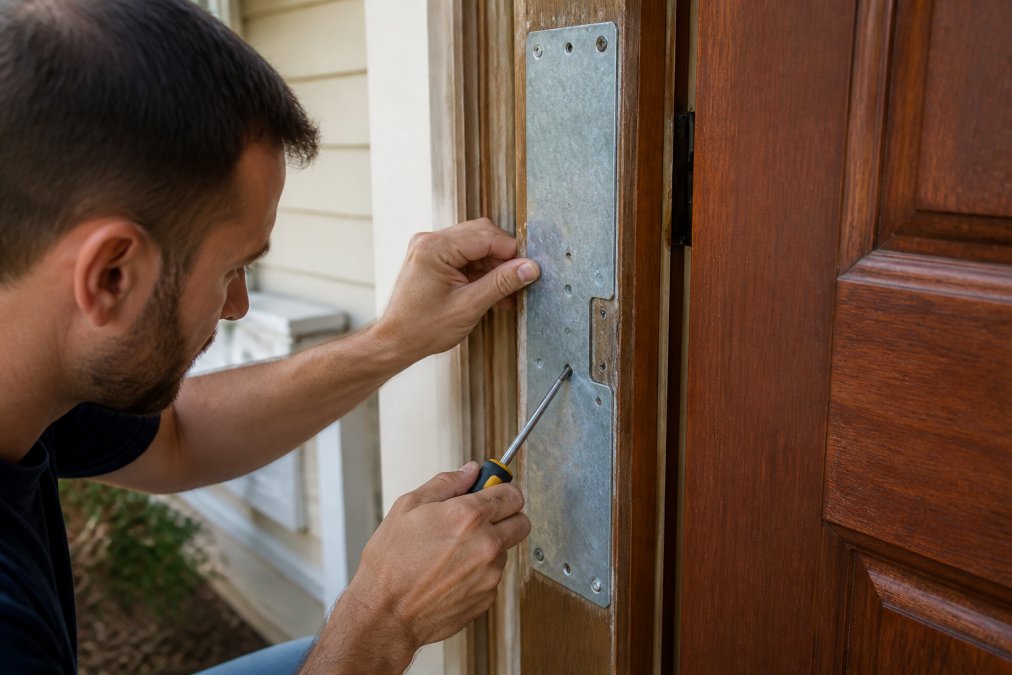
Here's the practical sequence:
- Replace the two short strike-plate screws with 3-inch screws that reach the wall stud
- Install a heavy-duty strike plate or full frame reinforcement that spans the lock area
- Add hinge-side reinforcement so the door can't be pried from the opposite edge
- Check that the deadbolt extends at least 1 inch into the frame
- Confirm the door doesn't swing outward, which exposes the hinges to attack
The single most common mistake is stopping after the strike plate. Attackers who can't kick the lock side will pry the hinge side instead. Both edges need attention.
Watch Out An outward-swinging door exposes its hinge pins to the outside. If yours swings out and the hinges aren't pinned or reinforced, an attacker can pop the door off the frame in seconds without touching the lock.
Best Door Security System 2026: Features That Matter More Than Price
The best door security system 2026 buyers can choose isn't the one with the longest feature list. It's the one that addresses forced entry at the frame. Price correlates weakly with kick-in resistance. A mid-range lock on a reinforced frame outperforms a premium lock on an unreinforced one, every time.
What You're Actually Paying For at Each Price Band
Smart lock pricing clusters into three rough bands, and the jump between them rarely tracks kick-in resistance:
- Under $100. Basic keypad or Bluetooth deadbolts with code entry and Bluetooth-only app control. No hub, no remote access, no auto-unlock. Build quality is usually zinc alloy with a plastic gear train.
- $100-$250. The mainstream tier: Wi-Fi or a hub bridge, guest codes, activity logs, and often a fingerprint reader. Most buyers land here, where the feature-per-dollar curve is steepest.
- $250 and up. Premium finishes, built-in Wi-Fi, Matter or Thread support, and sometimes camera integration. The marginal gain over the $150 tier is mostly convenience and aesthetics, not forced-entry resistance.
A reinforcement kit sits outside this curve entirely: a fraction of a mid-tier lock's cost, no battery, no firmware, no subscription, and it targets the failure point all three price bands share.
The Cost-Per-Year Math Most Reviews Skip
A smart lock isn't a one-time purchase. Add up the real five-year cost:
- Batteries. Most locks run on four AA cells, swapped roughly every 6-12 months depending on traffic and temperature.
- Hub or bridge. Some locks need a separate bridge to reach Wi-Fi, an extra device and failure point.
- Subscription. Cloud video, extended activity history, and some guest-access features sit behind monthly plans on certain brands.
- Replacement. Consumer electronics have a shorter service life than door hardware, so expect to replace a smart lock well before a mechanical deadbolt.
Mechanical reinforcement has a five-year cost of essentially zero after installation, no batteries, hub, plan, or app.
Ecosystem Compatibility: Match the Lock to the House You Already Have
If you do buy a smart lock, compatibility decides whether it's useful or a paperweight. Check these first:
- Apple Home / HomeKit. Requires HomeKit certification. Matter-over-Thread locks are the current path, and they need a Thread border router, often an Apple TV or HomePod.
- Amazon Alexa and Google Home. Broadly supported, but "works with Alexa" can mean anything from full voice control to a single on/off command. Read the fine print.
- Samsung SmartThings and Hubitat. Z-Wave and Zigbee locks integrate here. These mesh protocols extend range through other powered devices, which matters if your door is far from your router.
- Matter. The cross-ecosystem standard is the safest future-proofing bet, but early Matter locks have uneven feature parity across platforms. Verify the features you want work on your chosen hub.
A Bluetooth-only lock is fine for a single-family home where you're always in range, but wrong for a rental you manage from another state.
Features That Matter More Than Price
When evaluating any door security product, weigh these factors over brand prestige:
- Steel gauge and anchor depth. Thicker plates with longer screws into the stud resist more force.
- Coverage of all three weak points. Strike side, frame, and hinges.
- Installation time and reversibility. Under 30 minutes and removable matters for renters.
- Power independence. Mechanical reinforcement works during outages; battery locks don't.
- Discretion. Hardware matching existing trim doesn't advertise your security setup.
Door Armor's system is built around exactly this logic: a patented, galvanized steel reinforcement system that's police tested and recommended, installs in under 30 minutes, and backs the protection with a $500 Lifetime Guarantee against kick-ins. Over 500,000 doors are secured with it, and the design stays discreet enough to match your existing hardware.
Comparison: Smart Locks vs. Reinforced Traditional Hardware
| Factor | High-End Smart Lock | Reinforced Traditional Hardware |
|---|---|---|
| Primary benefit | Convenience, remote access | Forced-entry resistance |
| Weak point addressed | The lock cylinder | Frame, strike plate, hinges |
| Power dependency | Battery or wired | None |
| Rental-friendly | Sometimes | Yes, removable |
| Installation time | 30-60 minutes | Under 30 minutes |
| Failure mode | Dead battery, connectivity loss | Minimal, mechanical |
| Five-year cost | Batteries, hub, possible subscription | Near zero after install |
| Ecosystem dependency | HomeKit, Alexa, Google, Matter, Z-Wave | None |
Pro Tip If you're comparing a $200 lock against a $60 reinforcement kit, don't frame it as either/or. The strongest setup is a reinforced frame with whatever lock you already own, smart or not, sitting on top of it.
Privacy and Data Security: What High-End Smart Locks Don't Tell You
A connected lock collects data: entry times, user activity, and sometimes location patterns, all living in an app and on a company's servers. Most buyers never read the privacy policy before granting an app permanent access to their home's entry history.
The FTC's guidance on connected device privacy applies here. Look for locks with local storage options, two-factor authentication, and encryption of activity logs. If a lock requires cloud connectivity to function at all, you're trusting that company's infrastructure with your comings and goings indefinitely.
Mechanical reinforcement sidesteps the entire question. Steel doesn't log anything, doesn't phone home, and can't be breached through a server. For privacy-conscious homeowners, that's a feature, not a limitation.
Pro Tip Before buying any connected lock, search the app's privacy policy for how long entry logs are retained and whether they're shared with third parties. If you can't find a clear answer in two minutes, treat that as your answer.
Long-Term Maintenance and Durability of Smart Locks vs. Mechanical Reinforcement
Most smart lock reviews stop at unboxing and first-week impressions, but the failure modes that matter show up at the 12- to 24-month mark. Here's what actually wears out, and how mechanical reinforcement compares over the same window.
What Fails First on a Smart Lock
Electronic locks have moving parts, motors, and batteries; mechanical reinforcement has none. Over five to ten years, that difference compounds. Here's the typical wear sequence:
- Months 6-12: battery behavior changes. As the lock ages and the motor works harder against a slightly misaligned bolt, drain accelerates. Cold weather makes it worse.
- Months 12-18: finish wear. Exterior keypads and fingerprint readers take sun, rain, road salt, and sunscreen. Matte and painted finishes fade or chip first; brushed and satin hold up better. A faded keypad is cosmetic but the first visible sign of aging.
- Months 18-24: motor and gear-train strain. The motor that throws the deadbolt is the hardest-working component. Dust, temperature swings, and a door settled out of alignment increase the load. A lock that sounds labored is telling you the gear train is wearing.
- Year 2 and beyond: software and protocol drift. Firmware updates stop, app redesigns break integrations, and hub ecosystems migrate to newer wireless standards. A lock on an older protocol may lose hub connectivity entirely as platforms move on.
The Alignment Problem Nobody Warns You About
Doors move. Seasonal humidity swells the frame in summer and shrinks it in winter, and hinges sag. A deadbolt that lined up perfectly at installation can fight the strike plate a year later. On a mechanical lock, you feel the resistance and adjust the strike; on a smart lock, the motor works harder, drains the battery faster, and eventually stalls or throws an error code.
This is the most common long-term complaint, and it's a frame problem, not a lock problem. Reinforcing the frame and strike area keeps the door aligned and reduces the load on whatever lock sits above it.
What Mechanical Reinforcement Does Over the Same Window
A well-installed reinforcement kit's lifespan is measured in decades of the door itself. Nothing to update, charge, or replace, the steel plates don't care about protocol changes and just do the same job they did on day one.
The only maintenance is inspection: once a year, check that the screws are snug and the plates haven't shifted. No app, hub, firmware, or battery.
A Realistic 24-Month Cost and Effort Comparison
| Over 24 Months | Smart Lock | Reinforced Traditional Hardware |
|---|---|---|
| Battery swaps | 2-4 sets of AA cells | None |
| Firmware/app maintenance | Ongoing | None |
| Finish wear | Likely on exterior keypad | Cosmetic only on steel |
| Motor/gear strain | Increasing | Not applicable |
| Alignment adjustments | Often needed | Reduced by design |
| Replacement risk | Moderate | Low |
The Durability Argument, Stated Plainly
A smart lock's lifespan is measured in years of software support; a reinforcement kit's in decades of the door. If you want a connected lock's convenience, buy one, but put it on a frame that isn't the weak link. If you want the door still doing its job in ten years with no intervention, mechanical reinforcement is the answer.
Key Takeaway The 12- to 24-month window is where smart locks quietly degrade and where reviews go silent. Plan for battery, finish, and alignment maintenance on any connected lock, and treat frame reinforcement as the part of the system that doesn't need a maintenance schedule.
Troubleshooting Common Connectivity Failures in Smart Locks
Connectivity failures are the most common smart lock complaint, and they're usually fixable. The failure modes fall into a few predictable categories.
Lock won't respond to the app. Check the hub first, not the lock. Most locks connect through a hub, and an offline hub takes the lock with it. Reboot the hub before touching the lock.
Intermittent disconnects. Almost always signal strength. Wi-Fi locks struggle through metal doors and thick walls; Z-Wave and Zigbee mesh networks extend range through other powered devices, so adding a repeater often solves it.
Battery drains fast. Cold weather, frequent motor use, and weak signal all drain batteries faster, a lock searching for a weak signal burns power continuously. Low-battery notifications help, but a lock that dies while you're away leaves you using the physical key override.
Lock works manually but not remotely. That points to the network layer, not the lock hardware. Check your router, hub firmware, and whether the lock's wireless protocol is still supported.
Watch Out If your only entry method is a smart lock with no physical key override, a dead battery or failed hub locks you out of your own home. Always keep a mechanical backup entry path.
Conclusion: Choosing the Right Protection for Your Home
The security question isn't which lock is smartest, it's which setup actually stops a kick-in. High-end smart locks solve convenience well, but the frame fails first, and no app update fixes that.
Door Armor approaches the problem from the other direction. Its patented galvanized steel reinforcement system targets the weak points locks ignore, installs in under 30 minutes without a contractor, and stays discreet against your existing hardware. With a $500 Lifetime Guarantee against kick-ins and 20+ years of police-tested performance, it's protection that works whether or not the power is on.
Get started with Door Armor and reinforce the door you already have before the next attempt finds its weak point.
Frequently Asked Questions
Are traditional deadbolts more secure than smart locks?
A traditional deadbolt with a reinforced strike plate can be more resistant to forced entry than many smart locks. Smart locks add convenience like keyless entry and remote access, but their physical security depends on the same door frame and strike plate. Reinforcing those weak points with steel plates often provides better kick-in protection than upgrading the lock alone.
How can I reinforce my door without changing the lock?
You can install a door reinforcement kit that adds galvanized steel plates around the deadbolt and hinges. These kits screw into the studs behind the frame, making the door much harder to kick in. Most homeowners can install them in under 30 minutes with basic tools. This keeps your existing lock and hardware while adding real forced-entry protection.
Do smart locks prevent forced entry or just unauthorized access?
Smart locks primarily prevent unauthorized access through keyless entry, temporary codes, and activity logs. They do not reinforce the door frame or strike plate, which are the weakest points in a kick-in. For forced entry protection, you need physical reinforcement like steel plates or a security bar. Combining both gives you convenience and strength.
What is the most reliable way to secure a door against kick-ins?
The most reliable method is reinforcing the door frame and strike plate with galvanized steel. A police-recommended system like Door Armor uses patented steel plates that anchor into the studs, stopping kick-ins even against repeated blows. Pair that with a solid deadbolt and you have a door that resists forced entry far better than a smart lock alone.