



DIY vs Professional Home Security Installation: Key Differences
The choice between DIY vs professional home security installation comes down to three things: cost, control, and how much time you're willing to trade for savings. At Door Armor, we've watched that trade-off play out in hundreds of thousands of homes, and the honest answer is that most homeowners don't need a full alarm system to stop a forced entry. They need reinforced doors.
Here's the part the big alarm companies won't lead with: a door frame fails long before a lock does. A single well-placed kick splits the jamb, and the whole door swings open regardless of how expensive the deadbolt is. That's why home security installation decisions should start with the door itself, not the control panel.
Below, we'll break down what each route actually costs, how long it takes, and which one fits your situation.
Cost Comparison at a Glance
| Option | Upfront Cost | Recurring Fees | Time to Install | Best For |
|---|---|---|---|---|
| DIY door reinforcement | One-time purchase | None | Under 30 minutes | Most homeowners |
| DIY alarm kit | Moderate upfront | Optional monitoring | 2-4 hours | Renters, tech-comfortable |
| Professional alarm install | High upfront | Monthly contract | Scheduled visit | Full-home coverage |
The table tells the story fast. DIY door reinforcement is the only row with no recurring fees and no scheduling. Everything else adds either a monthly bill or a weekend of your time.
Cost of Professional Home Security Installation
Professional installation is not one price. It is four prices stacked on top of each other, and only the first one gets quoted to you on the sales call.
1. Equipment. Panels, keypads, door and window sensors, motion detectors, glass-break sensors, and cameras are typically bundled into a package tier. A basic three-door package and a full-perimeter package can differ by several hundred dollars before a single sensor is mounted.
2. Installation labor. Some providers fold the technician visit into the package price; others bill it separately, and it can scale with the number of devices and whether the home needs new wiring runs. Ask directly whether the quoted number includes labor or assumes a self-install.
3. Activation or setup fee. A one-time charge that appears at signing, separate from both equipment and labor. It is frequently waived during promotional periods and reinstated afterward, so confirm whether the waiver is permanent or introductory.
4. Monitoring. This is the line that actually determines your total cost of ownership. Monitoring is billed monthly, and the contract term is usually measured in years, not months. Multiply the monthly rate by the full term before you compare it to any upfront price.
Two more charges catch people at the end:
- Early termination fees. Cancelling before the term ends typically triggers a fee, sometimes calculated as a percentage of remaining payments rather than a flat amount.
- Auto-renewal. Many agreements renew automatically at the end of the term unless you give notice within a specified window. According to FTC guidance on home security contracts, consumers should read monitoring agreements carefully because auto-renewal and early cancellation clauses are common.
A simple way to compare the two routes
Do this before you sign anything:
- Write down the full upfront number (equipment + labor + activation).
- Write down the monthly monitoring rate.
- Multiply the monthly rate by the number of months in the contract term.
- Add the two figures together. That is your true cost of ownership for the term.
- Ask what happens on month one of year four, does the rate change, and does the contract renew?
Most homeowners are surprised by step 4, not step 1. The upfront quote is the visible cost; the term total is the real one.
The alternative is a one-time purchase you own outright. Door Armor's Single Door Security Set runs $79.00, installs in about 30 minutes, and carries no subscription at all. For a single entry door, that's the entire cost, forever, no activation fee, no term, no renewal window to track.
Watch Out: Signing a multi-year monitoring contract locks you into monthly fees that often exceed the equipment's value. Check the cancellation terms and the auto-renewal notice window before you sign anything.
Key Takeaway: If a provider will not give you the term total in writing before you sign, that is your answer. A one-time purchase has no term total to hide.
Home Security Installation Time Estimates
Time is the hidden cost in any home security installation project. A professional alarm system requires a scheduled appointment, a technician on site for several hours, and often a follow-up visit for connectivity issues.
DIY alarm kits run two to four hours for a moderately handy homeowner, plus troubleshooting time if wireless sensors drop off the network.
Door reinforcement is the outlier. A Door Armor kit installs in under 30 minutes with a screwdriver and no wiring, no drilling into walls, and no app pairing. That speed matters when you've just moved in or you're securing a rental between tenants.
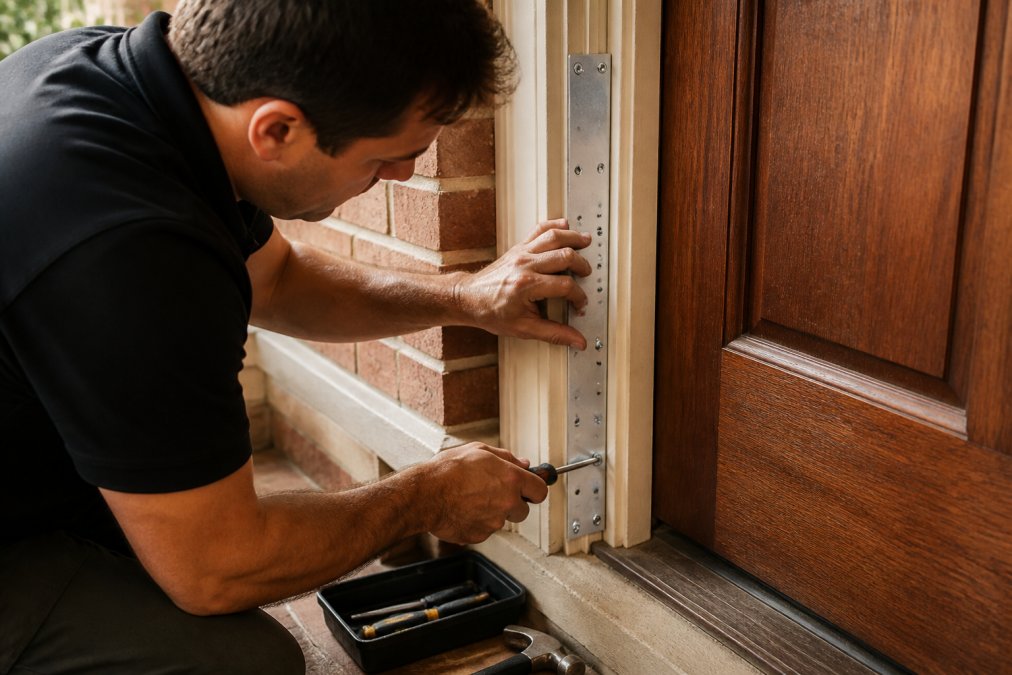
Close-up of a homeowner's hands installing a galvanized steel door reinforcement plate on a wooden door frame with a screwdriver, tools nearby on the floor
How to Reinforce Doors Against Forced Entry
Reinforcing a door against forced entry means protecting the frame and hinges, not just the lock. The lock is rarely the failure point. The jamb is.
Here's what actually stops a kick-in:
- Reinforce the strike plate area so the bolt can't tear through the frame
- Shield the hinges so the door can't be pried off its pins
- Secure the jamb itself to resist splitting under impact
- Add a deadbolt barricade on double doors where there's no center jamb
A common mistake is buying a heavier deadbolt and calling it done. The bolt holds, the frame doesn't, and the door still opens.
Door Armor's patented galvanized steel system reinforces exactly those weak points and is police tested and recommended. It's discreet enough to match your existing hardware, so your home doesn't end up looking like a fortress.
Technical Skill Assessment: What DIY Really Requires
Most guides tell you DIY is 'easy' or 'challenging' and leave it there. That is not useful when you are standing in a hardware aisle. Here is a pass/fail checklist you can run in about two minutes, before you spend anything.
The tools-and-patience checklist
Answer yes or no to each. Be honest, this is cheaper than buyer's remorse.
Door reinforcement (bolt-on kits)
- Do you own a screwdriver and a drill, or can you borrow them?
- Can you follow a printed instruction sheet without a video?
- Are you comfortable working on the door while it stays on its hinges?
- Do you have 30 minutes without interruptions?
If you answered yes to all four, you can install a bolt-on reinforcement kit. That is genuinely the whole bar, no wiring, no wall drilling, no app pairing, no panel programming.
DIY alarm kits
- Are you comfortable drilling into door frames and walls?
- Can you mount sensors at the correct height and angle without a second set of hands?
- Are you willing to program a control panel and set up user codes?
- Can you troubleshoot a sensor that drops off the wireless network, and re-pair it?
- Do you have a ladder and a free afternoon?
- Will you still be comfortable doing this if a sensor fails six months from now?
If you hesitated on any of the last three, the DIY alarm route is likely to cost you more in frustration than it saves.
Professional installation
- Are you willing to schedule an appointment and be home for it?
- Are you comfortable with a technician drilling into your walls and frames?
- Are you prepared for a possible follow-up visit if connectivity issues appear?
What the checklist does not cover
Here is the part the checklist cannot fix, and it applies no matter which route you pick: professional installation still leaves the door frame untouched. A technician mounts the panel and sensors. The jamb stays exactly as weak as it was. You can pay for a full monitored system and still have a door that splits on the first kick.
That is why the skill question and the hardware question are separate. The skill question is about who installs the electronics. The hardware question is about whether the frame itself can take an impact.
Pro Tip: Before buying any system, test your door's weak point yourself. Push on the frame near the lock with your thumb. If it flexes, that's where an intruder will strike first, and no amount of panel programming changes that.
Key Takeaway: Use the checklist to decide who installs. Use the thumb test to decide what actually needs installing. They are not the same decision, and only one of them stops a kick-in.
Resale Value, Privacy, and False Alarm Management
Three angles most guides skip: resale, privacy, and false alarms.
Permanent alarm wiring and drilled sensors can complicate a home sale, and buyers sometimes ask for monitoring contracts to be cleared before closing. Bolt-on door reinforcement is removable and travels with you if you rent.
Privacy is the other quiet issue. Smart alarm systems with cameras and app control collect data about your household's comings and goings. A mechanical reinforcement kit collects nothing.
False alarms are the third. Self-monitoring setups trigger nuisance alerts that lead to emergency dispatch calls you didn't want. Door Armor is always active without power or connectivity, so there's nothing to false-trigger.
Conclusion
The real question isn't DIY versus professional. It's whether you're protecting the lock or the door. Most break-ins exploit the frame, and no alarm panel fixes a split jamb.
Door Armor reinforces the weak points that actually fail, with a patented galvanized steel system that installs in under 30 minutes, carries a $500 Lifetime Guarantee against kick-ins, and needs no power or monitoring contract. Over 500,000 doors secured and 20+ years in business back that up.
Get started with Door Armor and close the gap an intruder is counting on.
Frequently Asked Questions
How much is a professionally installed home security system?
Professional installation typically costs $100 to $500 upfront, depending on the system and home size. Monthly monitoring runs $20 to $60. That's separate from the equipment itself, which can add several hundred dollars. DIY options like Door Armor's kits start at $79 and install in 30 minutes with no monthly fees, making them a lower-cost alternative for door reinforcement.
Is DIY home security installation as reliable as a professional system?
It depends on the product. Door Armor's galvanized steel kits are police-tested and backed by a $500 Lifetime Guarantee against kick-ins. Once installed, they don't rely on power, Wi-Fi, or batteries, so there's nothing to fail. Professional electronic systems add monitoring and alerts, but the physical door reinforcement is what stops a forced entry attempt.
What do police recommend for home security?
Law enforcement consistently recommends reinforcing door frames and hardware because most burglars enter through doors. Door Armor is police-tested and recommended, with over 500,000 doors secured. The focus is on stopping kick-ins and prying, which are the most common forced entry methods. A reinforced door buys critical time for you to call for help.
How long does it take to install basic home security hardware?
Installation time varies by product. Door Armor's single door kit takes about 30 minutes with basic tools. Professional electronic systems often require 2 to 4 hours for a technician to install and configure. If you're comparing DIY vs professional home security installation, the time savings of a 30-minute DIY kit are significant, especially if you're securing multiple doors.